.png)


How to Choose a Check-In/Checkout Software for Your Center?

Check-in and checkout may seem like a simple function: a student arrives, checks in, and checks out when leaving.
But for an after-school learning center, attendance is connected to much more than recording who walked through the door. It touches student safety, parent communication, scheduling, staffing, payroll, center capacity, reporting, and the overall parent experience.
That is why choosing a check-in/checkout system should not simply be a search for the least expensive app that can record an arrival and departure.
The better question is: What will this system do for my center every day?
Here are some important factors to consider.
#1 Look Beyond Check-In And Checkout
A basic system may record a timestamp. That solves one problem, but leaves many others for the instructor and staff to manage.
A modern system should help answer questions such as:

When these functions work together, attendance becomes more than a digital sign-in sheet.
It becomes operational intelligence for the center.
#2 Parent Communication Should Be Part Of The Experience

Parents increasingly expect visibility.
A check-in notification tells them their child arrived safely. A checkout notification lets them know when the student left. Two-way messaging gives the center a professional way to communicate without instructors and staff relying on personal phones.
Pickup authorization is another important consideration. Centers should think beyond simply recording that a student left and consider whether the system helps establish who was authorized to pick up the student and provides an appropriate record of the transaction.
These capabilities may seem secondary when comparing products, but they can become extremely important when something unexpected happens.
The right technology should reduce uncertainty for both the instructor and the parent.
#3 Scheduling And Attendance Should Work Together
One of the biggest operational challenges in an after-school center is uneven student traffic.
Forty students arriving during one period and fifteen arriving during another affects everything from classroom congestion to staffing requirements and the quality of instruction.
A scheduling system connected with attendance can help centers establish capacity by timeslot, allow parents to select appropriate times, identify late arrivals and absences, and compare scheduled attendance with what is actually happening in the center.
This provides something a standalone check-in app cannot easily provide: the ability to plan before students arrive, not simply record what happened afterward.
#4 Don't Overlook Employee Time and Payroll
Labor is one of the largest operating costs for most learning centers.
If student scheduling, actual attendance and employee hours are managed separately, it becomes difficult to see whether staffing really matches demand.
Consider a simple example. If attendance data consistently shows that student volume drops substantially during the last 30 minutes of the day, do you need the same number of employees during that period?
Small staffing adjustments repeated week after week can add up to meaningful savings.
A platform that connects student scheduling, actual attendance, employee availability, assignments and staff hours gives the instructor much better information for making those decisions.
The goal isn't simply to track payroll. It is to use data to optimize it.
#5 Be Careful About Building a Collection of Siloed Apps
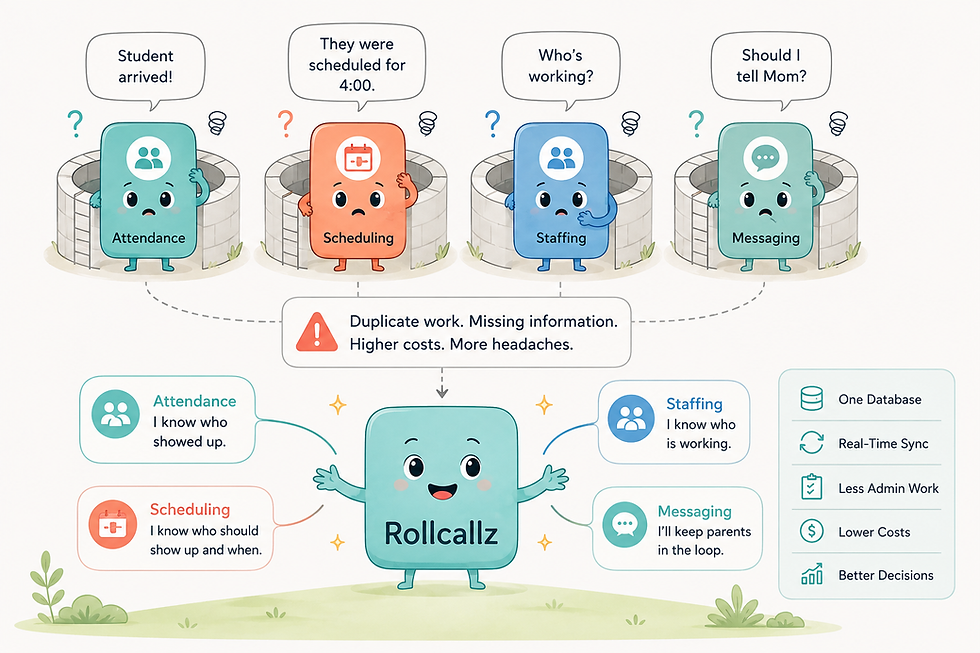
It can be tempting to choose the cheapest solution for every individual problem.
One app for check-in. Another for scheduling. Another for texting. A spreadsheet for employee hours. Another service for payments. Perhaps another tool for student activities or resources.
Individually, each may appear inexpensive.
Collectively, they can become surprisingly costly.
There is the obvious cost of multiple subscriptions, but there are also less visible costs: entering the same information in multiple systems, maintaining multiple parent and student lists, training employees on different applications, reconciling inconsistent information, managing multiple vendors, switching between screens throughout the day, and troubleshooting integrations when something changes.
Most importantly, separate systems often cannot see the relationships between the information they contain.
Your attendance system knows who arrived.
Your scheduler knows who was supposed to arrive.
Your staffing system knows who was working.
Your messaging system knows what was communicated to the parent.
When those systems are connected, the center gains a much more complete operational picture.
Integration isn't just about convenience. It reduces administrative overhead and creates a single operational workflow.
#6 Evaluate Reliability, Support and Proven Use
A check-in system becomes part of your center's daily operation. Once parents and staff depend on it, reliability matters.
Before choosing a platform, ask how it performs in real operating environments, whether it has been used by centers similar to yours, how quickly support issues are addressed, whether the product is actively being improved, and whether it can grow as your center's needs change.
A low price can be attractive during evaluation.
But the true test comes at 4:15 PM on a busy class day when students are arriving, parents are waiting, employees need information and the instructor has a center to run.
That is when a software product stops being a feature list and becomes part of your operation.
#7 Consider The Parent Experience
Parents may never see your administrative dashboard, but they experience the results of your operational systems every week.
They notice when check-in is smooth.
They appreciate receiving timely arrival and departure notifications.
They notice when scheduling is easy.
They appreciate quick communication.
They value an organized pickup process.
And they notice when a center appears well run.
Technology alone does not create customer loyalty, but technology can remove many of the small frustrations that gradually affect customer satisfaction.
For a recurring-revenue business, retaining even a small number of families because of a better overall experience can offset a significant portion of the cost of the technology supporting it.
#8 Price Matters. But Calculate The Right Price.
It is natural to compare monthly subscription prices.
Suppose one product costs $20 or $30 per month while another costs substantially more. Looking only at the subscription, the decision appears obvious.
But subscription price is not the same as operating cost.
Ask instead:
How many staff hours does this system save each month?
If automation saves even a few hours of administrative work, reduces unnecessary employee hours, eliminates another software subscription, prevents manual errors, or helps retain one additional student, the economics can change dramatically.
For example, saving just 15 minutes of administrative work per class day can translate into several hours every month. Better staffing decisions can produce additional savings. Automating routine parent communications saves still more time.
And some benefits are difficult to put into a spreadsheet: knowing exactly who is in your center, having a record of attendance and pickup activity, and being able to answer a parent's question immediately.
That is why operational software should be evaluated as an investment rather than simply an expense.
The question isn't:
"How much does this software cost?"
It is:
"What does this software save, improve or protect for my center?"
Where Rollcallz Fits
This broader view of center operations is the philosophy behind Rollcallz.
Rollcallz goes beyond basic check-in and checkout by bringing together capabilities that after-school learning centers use throughout the day, including QR-code attendance, real-time attendance visibility, automated parent notifications, two-way messaging, smart scheduling and timeslot capacity management, employee scheduling and time tracking, payroll reporting, pickup authorization, resource management, reporting and other center operations.
The value is not simply that these features exist.The value is that they work together.
A student's schedule can provide context for attendance. Attendance can trigger parent communication. Student volume can inform staffing decisions. Staff hours can feed payroll reporting. Historical information can help the instructor identify patterns and make better operating decisions.
Instead of assembling several disconnected applications and then becoming the person responsible for connecting them, the instructor has a platform designed around the workflow of an after-school learning center.
That can mean less administrative work, fewer manual processes, better visibility, more informed staffing decisions and a more professional parent experience.
Ultimately, technology should give an instructor something extremely valuable:
more time to focus on students and less time managing the mechanics of running the center.
The Bottom Line
When evaluating check-in/checkout software, don't choose based on the check-in screen alone.
Think about what happens before the student arrives, while the student is in the center, when the student leaves, and after the center closes for the day.
Look at safety. Look at communication. Look at scheduling. Look at staffing. Look at reporting. Look at the parent experience. Look at administrative time. And then look at price in the context of all those things.
The least expensive software is not necessarily the lowest-cost solution.
The right platform should save time, reduce risk, control operating costs, improve the customer experience and give you greater peace of mind.
That is a much better standard by which to make the decision.


Comments